
Data is at the heart of modern technology. From online shopping platforms and business applications to artificial intelligence systems, organizations depend on databases to store information and retrieve it when needed. However, as data becomes more complex, traditional database methods are not always enough for every type of search.
This is where vector databases are becoming increasingly useful. They help applications find information based on meaning and similarity rather than relying only on exact words or matching values.
Although vector databases and traditional databases both help manage information, they serve different purposes. Understanding how they work, where they differ, and when to use each can help businesses make better decisions about their data infrastructure.
What Is a Traditional Database?
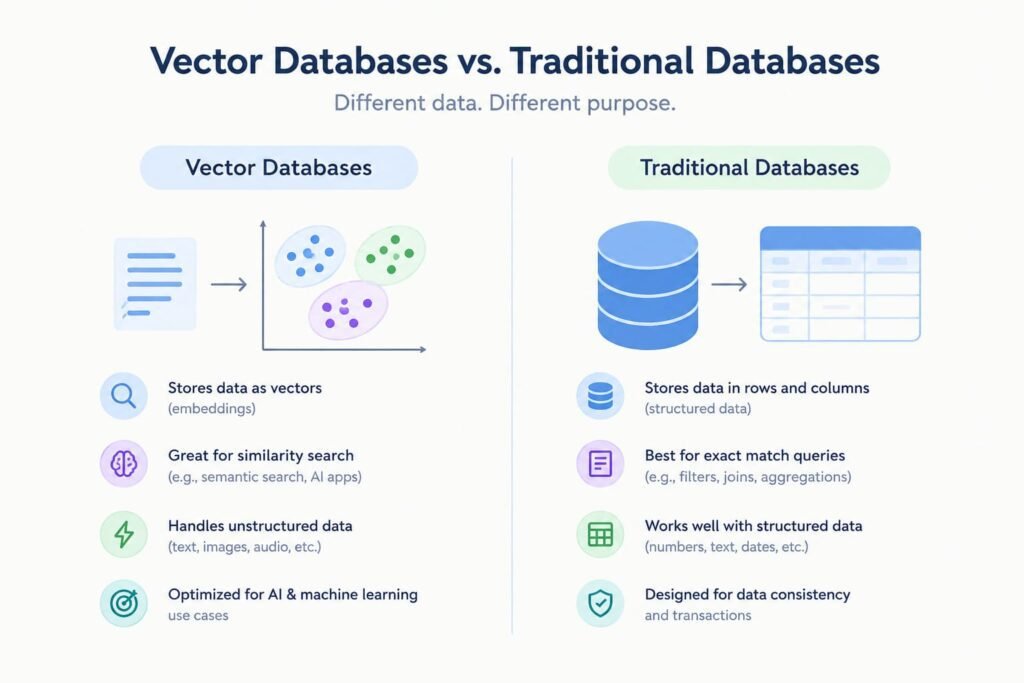
A traditional database stores and organizes information in a structured format. Relational databases, for example, use tables made up of rows and columns. Each column represents a particular field, while each row contains a record.
Consider an online store that maintains customer information, product prices, order numbers, and payment records. A traditional database can efficiently organize these details and retrieve specific information when requested.
For example, a store manager might search for all orders placed by a particular customer or identify products priced below a certain amount. Traditional databases are well suited to these tasks because they support structured queries, filtering, relationships, and reliable transactions.
Popular examples include MySQL, PostgreSQL, Microsoft SQL Server, and Oracle Database.
Key Characteristics of Traditional Databases
- Structured data management: Organizes information into tables or other defined structures.
- Precise querying: Retrieves records using specific values, conditions, and filters.
- Transaction support: Helps maintain data consistency during operations such as payments and order updates.
- Relationship management: Connects related records, such as customers and their purchases.
- Business application support: Powers systems such as inventory management, accounting, and customer relationship management.
Traditional databases remain essential for applications that depend on accurate records and predictable data operations.
What Is a Vector Database?
A vector database is designed to store, organize, and search numerical representations of data called vector embeddings. These embeddings are generated by machine learning models and can represent information such as text, images, audio, and other content.
Instead of searching only for an exact word or value, a vector database can identify information that is conceptually similar to a user’s query.
For example, imagine searching a product catalog for “comfortable shoes for walking.” A keyword-based search may prioritize products containing those exact words. A vector search system can also find relevant products described as “lightweight everyday sneakers” because the descriptions may have similar meanings.
Vector databases make this possible by comparing vectors using similarity measures and specialized indexing techniques.
Common examples include dedicated vector database platforms such as Pinecone, Milvus, and Weaviate. Some traditional database systems also support vector search, allowing businesses to combine both approaches.
Key Characteristics of Vector Databases
- Similarity-based retrieval: Finds information based on how closely its vector representation matches a query.
- Embedding storage: Stores numerical representations created by machine learning models.
- AI application support: Helps power semantic search, recommendation systems, and AI assistants.
- Unstructured data discovery: Supports searching content such as documents, images, and audio through their embeddings.
- Specialized indexing: Uses vector indexes to improve the efficiency of similarity searches across large datasets.
These capabilities make vector databases especially useful for applications that need to understand the context behind a search.
Vector Databases vs. Traditional Databases: Key Differences
Although both database types store and retrieve information, their main differences relate to data representation, search methods, and intended workloads.
1. Data Storage and Organization
Traditional databases commonly organize structured information into tables, records, and fields. This arrangement works well for clearly defined data, such as customer IDs, product prices, employee records, and transaction histories.
Vector databases focus on storing embeddings, which represent information as numerical arrays. They can also store metadata and references to the original content, helping applications identify the source of a search result.
The main distinction is not that one database stores data while the other does not. Both do. The difference lies in how they represent and index information for retrieval.
2. Search and Query Methods
Traditional databases are effective when an application needs an exact answer. A query can identify a specific order number, retrieve a customer record, or filter products by price.
Vector databases are designed to find similar items. They compare a query embedding with stored vectors and return results that are close according to a selected similarity measure.
For instance, a user searching for “ways to reduce electricity consumption” might receive documents about energy efficiency even if those documents use different wording.
However, vector search does not always replace keyword search. Exact identifiers, technical codes, and specific numerical values may be better handled through traditional queries or combined search methods.
3. Data Types and Use Cases
Traditional databases are particularly suitable for structured business information, including financial transactions, inventory records, and operational data.
Vector databases are useful when information needs to be discovered through semantic relationships. This includes searching large document collections, finding visually similar images, recommending related products, and retrieving relevant material for AI-generated responses.
A business may use a traditional database to maintain product prices and stock levels while using vector search to recommend products based on descriptions or customer interests.
4. Performance and Indexing
Both database types can provide fast query performance, but the methods they use differ.
Traditional databases rely on indexes designed for operations such as exact lookups, sorting, filtering, and range queries.
Vector databases use specialized indexes to locate nearby vectors efficiently. Depending on the chosen index and configuration, a system may trade some search accuracy for faster retrieval.
Performance depends on several factors, including dataset size, hardware, query complexity, indexing strategy, and workload. A vector database is not automatically faster for every search task.
5. Accuracy and Search Relevance
Traditional databases are effective at returning records that satisfy clearly defined conditions. If a query asks for orders with a particular status, the system can return records matching that status.
Vector databases focus on similarity rather than strict equality. Their results depend on the quality of the embedding model, the chosen similarity measure, and the relevance of the stored content.
For example, a semantic search system may identify documents discussing similar concepts even when they use different terminology. However, a high similarity score does not guarantee that a document is factually correct or suitable for every question.
Combining semantic search with keyword filters can improve retrieval quality when both meaning and precision matter.
6. Scalability and Resource Requirements
Traditional databases can scale to support large workloads through techniques such as indexing, replication, partitioning, and distributed processing, depending on the database system.
Vector databases are designed to handle high-dimensional embeddings and similarity queries at scale. Large collections of vectors can require substantial memory, storage, and indexing resources.
The appropriate architecture depends on the number of records, vector dimensions, update frequency, response-time requirements, and budget. Businesses should evaluate actual workload requirements instead of assuming that one database design will always be more economical.
Comparison Table: Vector Databases vs. Traditional Databases
| Feature | Traditional Databases | Vector Databases |
|---|---|---|
| Primary purpose | Manage and query business data | Search for similar information |
| Data representation | Commonly rows, columns, and records | Numerical vectors with optional metadata |
| Search approach | Exact matches, filters, and structured queries | Similarity-based retrieval |
| Common workloads | Transactions, reporting, inventory | Semantic search, recommendations, AI retrieval |
| Indexing | B-trees, hash indexes, and other structures | Vector indexes and nearest-neighbor methods |
| Best suited for | Precise data operations | Context-aware information discovery |
| AI integration | Depends on available features and architecture | Designed to support vector-based AI workflows |
| Examples | MySQL, PostgreSQL, SQL Server | Pinecone, Milvus, Weaviate |
Note: These categories are not mutually exclusive. Some traditional databases support vector storage and similarity search alongside conventional database operations.
Real-World Applications of Vector Databases
Vector databases are useful in several industries where finding relevant information matters as much as storing it.
AI-Powered Search
Organizations can use vector search to help employees and customers discover relevant documents without knowing the exact words used in the original content.
For example, an employee searching for information about parental leave may find a policy document titled “Family and Employee Benefits” if its embedding is sufficiently similar to the query.
Recommendation Systems
E-commerce platforms and content services can use embeddings to identify products, articles, movies, or other items with similar characteristics.
A recommendation engine might suggest related products based on product descriptions, images, or other information represented as vectors.
Customer Support and AI Assistants
Vector databases can help AI assistants retrieve relevant information from support articles, product documentation, and internal knowledge bases.
This is particularly useful in retrieval-augmented generation (RAG), where an application retrieves relevant documents and supplies them as context to a language model before it generates a response.
Image and Multimedia Search
Images and audio can be converted into embeddings using suitable machine learning models. A vector database can then help locate similar media without relying entirely on filenames or manual labels.
This can support visual product discovery, media libraries, and content management systems.
When Should You Choose a Traditional Database?
A traditional database is generally a strong choice when your application depends on accurate records, structured queries, and dependable transaction processing.
Consider using one when you need to:
- Manage customer accounts, orders, or payment records.
- Track inventory, prices, and product availability.
- Generate reports using specific filters and calculations.
- Maintain relationships between structured records.
- Support applications that require consistent updates and reliable transactions.
For many business systems, these capabilities are more important than semantic similarity search.
When Should You Choose a Vector Database?
A vector database is worth considering when users need to discover information based on meaning, context, or similarity.
It may be appropriate when you want to:
- Build semantic search for documents or websites.
- Develop AI assistants that retrieve relevant knowledge.
- Recommend similar products, images, or content.
- Search large collections of text or multimedia using embeddings.
- Retrieve contextual information for machine learning applications.
Before selecting a dedicated vector database, check whether your existing database already supports the required vector features. Using an existing platform may reduce operational complexity, while a specialized system may be better suited to particular scale or performance requirements.
Can Vector and Traditional Databases Work Together?
Yes. In many applications, combining both approaches provides a practical solution.
Imagine an online shopping platform. Its traditional database manages customer details, stock quantities, prices, and completed orders. A vector search component helps customers discover products using natural-language descriptions or images.
When a customer searches for “a lightweight backpack for weekend travel,” the vector search system can identify semantically related products. The application can then use traditional database queries to filter those results by availability, price, brand, or delivery region.
This combined approach supports both flexible discovery and precise business rules.
Hybrid search can also combine keyword matching and vector similarity in a single retrieval workflow. This is useful when applications need to understand a query’s meaning while preserving exact matches for product codes, names, or technical terms.
Challenges to Consider Before Choosing a Database
Choosing a database involves more than comparing search capabilities.
Data preparation: Vector search typically requires an embedding model to convert source content into numerical representations. Generating and updating these embeddings adds another step to the data pipeline.
Cost and infrastructure: Storage, indexing, compute resources, and ongoing maintenance can affect total ownership costs.
Search quality: Vector similarity depends on the embedding model, content quality, and retrieval configuration. Testing with realistic queries is important.
Security and governance: Organizations must consider access controls, sensitive information, data retention, and compliance requirements regardless of the database type.
Integration and maintenance: A new database may introduce additional systems to operate and monitor. Existing platform capabilities should be evaluated before adding another component.
A small proof of concept using representative data can help determine which approach delivers the best balance of relevance, speed, cost, and reliability.
Conclusion
Vector databases and traditional databases solve different but increasingly connected data challenges. Traditional databases remain essential for structured information, reliable transactions, and precise queries. Vector databases provide specialized capabilities for finding related information through semantic similarity.
The right choice depends on what an application needs to accomplish. Businesses managing financial records or inventory may rely primarily on traditional databases, while AI-powered search and recommendation applications may benefit from vector retrieval.
In many modern systems, the strongest approach is not choosing one over the other. It is combining structured data management with similarity-based search to make information both reliable and easier to discover.
As AI applications continue to develop, understanding these database approaches can help organizations build more flexible, useful, and scalable data systems.
Frequently Asked Questions
1. What is the main difference between vector databases and traditional databases?
Traditional databases are designed to store and retrieve structured information using specific values and queries. Vector databases focus on finding similar information by comparing numerical representations called embeddings, making them useful for semantic search and AI applications.
2. Are vector databases better than traditional databases?
Neither database type is better for every situation. Traditional databases are suitable for transactions, customer records, and inventory management, while vector databases are useful for similarity searches, AI-powered recommendations, and retrieving information based on meaning.
3. Can a traditional database support vector search?
Yes. Some traditional database systems, including PostgreSQL with the pgvector extension, support vector storage and similarity search. This allows developers to combine structured queries and vector-based retrieval within a single database system.
4. When should a business use a vector database?
A business should consider a vector database when it needs semantic search, AI assistants, personalized recommendations, or similar-content discovery. The best choice depends on data size, search requirements, performance goals, budget, and existing infrastructure.